|
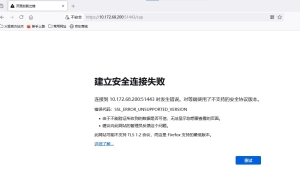
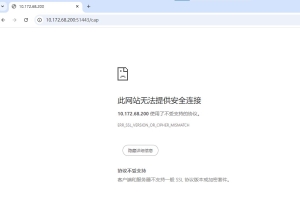
故障現象:MP C3503 安裝完Greenland 軟件後,可以正常進入機器Web 頁,可以正常進入ELP 後臺。地址欄嘗試输入https://XXX: 8080/cap或http://XXX:8080/cap,并嘗試了三种浏覽器,分别是Microsoft Edge, Chronnme,Firefox,依舊無法進入,機器固件版本Ver.32.00,安裝工具RemoteInstallManager_srv_V185。電腦是Win10 系统。 故障圖如下 Microsoft Edge 浏覽器
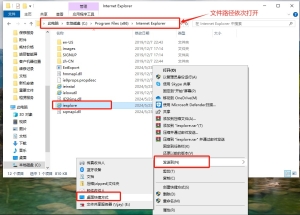
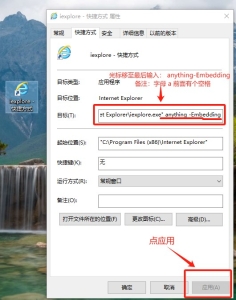
解決方案:使用Internet Explorer 浏覽器访問軟件後臺网頁。 步骤一:打開電腦路径C:\Program Files (x86)\Internet Explorer,将iexplore 程序創建桌面快捷方式。
步骤二:右击iexplore 快捷方式,打開屬性,修改目標,光標移至最後,输入 anything-Embedding,字母a 前面是空格。
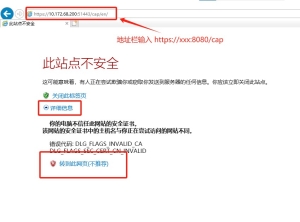
步骤三:打開桌面iexplore 快捷方式,Internet Explorer 浏覽器地址欄输入:https://XXX:8080/cap,點击詳細資訊,點击轉到此网頁(不推荐)。
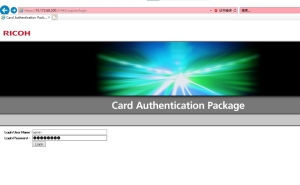
步骤四:账號admin,密码password,登入即可。
|
版權聲明:
相關侵權、舉報、投诉及建議等,请發 E-mail:weixiuwang68@qq.com